
Disclosure: This post may contain affiliate links, including Amazon links. As an Amazon Associate I earn from qualifying purchases. Commissions may be earned at no extra cost to you. Content is for informational purposes only and not professional advice.
Editor's Update, July 2026: Google renamed NotebookLM to Gemini Notebook on July 16, 2026. It's the same tool with the same features under a new name, so every "NotebookLM" reference below still applies.
Most solopreneurs are stuck paying for a patchwork of tools that do not talk to each other. One app for writing, another for automation, another for notes, another for design, another for proposals. None of them share context. None of them remember your business.
Google has quietly assembled something different: a connected AI ecosystem where memory, research, writing, automation, and creative production all run through the same account and the same context. Most of it costs nothing. A couple of the most powerful pieces require a paid plan, and this guide tells you exactly which ones so you are not blindsided.
By the end, you’ll know which Google AI tools form a free-to-low-cost virtual team, how they connect into a single memory loop, and how to turn basic prompting into multi-step “Agentic Flows” that run parts of your business with less manual input.
5-Minute Version
- Google’s AI ecosystem gives solopreneurs a near-complete virtual team: Gemini for research and strategy, NotebookLM for zero-hallucination business memory, Gemini Gems for reusable role-based assistants, and Opal for no-code automation. All of these are free with a Google account.
- Two more powerful pieces, Google Flow (creative generation) and Workspace Studio (inbox/sheet automation), require a paid subscription, so this is a low-cost stack, not a fully free one.
- The tools connect through NotebookLM as a shared memory layer, so a Gem can pull from your real business data instead of generic answers.
- Start with one Agentic Flow, such as turning one piece of content into a week of posts, using only the free tools before paying for anything.
What Counts as Google’s Agentic AI Ecosystem?
Google’s agentic AI ecosystem is the set of connected tools that share context across your Google account so a solopreneur can research, write, automate, and create without re‑explaining their business at every step. The ecosystem includes Gemini, NotebookLM, Gemini Gems, Workspace Studio, Opal, and Flow. Most of these are free or included in a personal Google account, and two require a paid subscription.
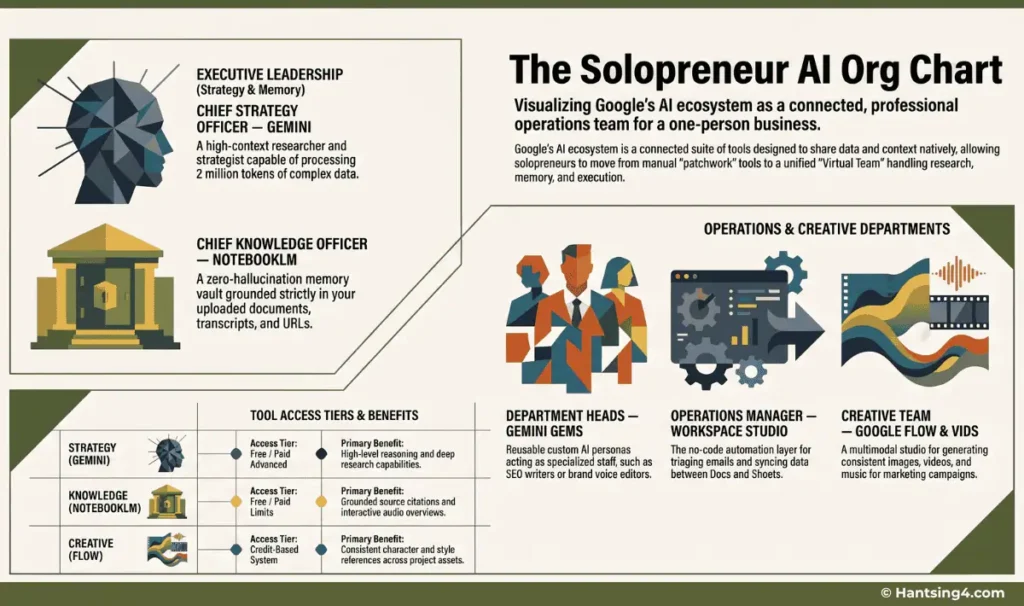
The Solopreneur AI Org Chart
Think of this ecosystem as a fully staffed operations team, minus most of the payroll.
Chief Strategy Officer — Gemini
Your researcher and high-context thinker. Free at the basic tier, with a paid Advanced tier for deeper reasoning and a larger context window.
Chief Knowledge Officer — NotebookLM
Your zero-hallucination memory vault. Free, with expanded limits on paid Google plans.
Department Heads — Gemini Gems
Reusable custom AI personas such as SEO writer, proposal auditor, brand voice editor, or CRM assistant. Free with a Google account.
Automation Engineer — Google Opal
A no-code builder for custom AI mini-apps. Free, US-launched and now expanding to more countries.
Creative Team — Google Flow
Image, video, and music generation in one workspace, built on Google’s Veo and image models, with consistent character and style references across a project. This has a free tier. The platform uses a credit system to control how much you can generate: Free users get 50 free credits every single day, along with a one-time bonus of 100 credits when you start. These daily credits do not roll over to the next day. You can get more credits with AI Pro subscription.
Operations Manager — Google Workspace Studio
No-code automation for Gmail, Docs, Sheets, and Chat. This is not free and is bundled into Google Workspace Business and Enterprise plans, not the free consumer tier.
This is a low-cost stack, not a zero-cost one. Four of these six roles are free. Two require a subscription you’ll want to budget for once your content or client workload justifies it.
Part 1: What Each Tool Actually Does for a Solo Business
Gemini — The Strategic Director
Gemini’s deep research mode pulls together competitor analysis, market mapping, and source-backed answers, and its outputs export directly into Docs, Sheets, Slides, and Vids.
Use it for: business planning, research, content strategy, first-draft proposals.
NotebookLM — The Flawless Business Memory
NotebookLM stays grounded strictly in the sources you upload, such as PDFs, Docs, URLs, YouTube transcripts; instead of pulling from general web knowledge, which is what makes it reliable for things you can’t afford to get wrong. It can also generate two-host audio conversations that summarize your source material out loud, useful for reviewing long documents on the go.
Use it for: product specs, pricing sheets, SOPs, case studies, and customer research — your “zero hallucination zone.”
Gemini Gems — The Specialized Department Heads
Gems are custom AI personas with persistent rules, tone, and logic, and they can be linked directly to a NotebookLM notebook so they answer from your actual business data instead of generic knowledge.
Use it for: a reusable SEO writer, proposal auditor, content strategist, or CRM assistant.
Google Opal — The Builder Layer
Opal lets you describe a workflow in plain language, such as “research a topic, summarize it, write a caption, save it to a Doc”, and it builds a visual, editable flow that runs it for you, no code required.
Use it for: client intake forms, simple calculators, and lightweight workflow automations you’d otherwise need a developer for.
Google Flow — The Creative Studio (paid)
Flow combines image generation, video generation, and music creation in one workspace, built on Google’s Veo and image models, with consistent character and style references across a project.
Use it for: Pinterest pins, ad creatives, and short promotional video once you’re on a paid plan.
Google Workspace Studio — The Automation Engine (paid, Workspace plans only)
Workspace Studio lets you describe an automation in plain English — “if an email contains a question for me, label it and ping me in Chat” — and it builds the workflow natively inside Gmail, Sheets, and Chat.
Use it for: Inbox triage, lead logging, and follow‑up drafting if you are already paying for Google Workspace Business Standard or above, since it isn’t part of the free consumer tier.
Part 2: The Connected Memory Loop
The real advantage of this ecosystem isn’t any single tool — it’s that NotebookLM acts as a shared memory layer the rest of the system can draw from.
The loop looks like this: Your raw data → NotebookLM (cleans and organizes it) → Gemini Gems (applies role-specific logic, synced to that memory) → Workspace or Docs (executes the output)
The practical effect: no hallucinated facts about your own business, no re-explaining context every session, and no copy-pasting between five different tabs. Once a Gem is linked to your NotebookLM source vault, it behaves like a teammate who’s actually read your operations manual.
Part 3: Turning AI Into Employees — Agentic Flows
An Agentic Flow is a multi-step sequence where one tool’s output becomes the next tool’s input, with minimal manual handling in between. Here are three worth building first.
Flow 1: The Content Repurposing Flywheel
For creators, bloggers, and affiliate marketers who want one piece of source content to become a week of output.
- Drop a YouTube URL or transcript into NotebookLM
- NotebookLM extracts key timestamps, insights, and quotes
- A “Content Strategist” Gem turns that into a blog post, social breakdowns, and a newsletter draft
- Export directly into Docs or Gmail
Flow 2: The Proposal Engine
For freelancers, coaches, and service providers who need accurate, custom proposals fast.
- Build a source vault in NotebookLM with your services, pricing, and past work
- Create a “Proposal Writer” Gem linked to that vault
- Paste in a client’s request
- Export the draft to Docs for final review
Flow 3: The Operations Assistant
For admin‑heavy solopreneurs and micro‑agencies. This flow requires Workspace Studio, so it assumes a paid Workspace plan.
- Workspace Studio watches your Gmail
- Gemini summarizes and classifies incoming messages
- Leads get logged automatically into Sheets
- Reply drafts are generated based on past interactions
Building a Stack That Fits Your Budget
You do not need every piece on day one. Gemini, NotebookLM, Gemini Gems, and Opal cover research, memory, specialized writing help, and basic automation without a subscription. Flow and Workspace Studio are worth adding once your content volume or client load justifies the cost.
Start with one flow, such as the content flywheel or the proposal engine, using only the free tools. You will reclaim real time before you spend a dollar.
Explore the Full Gemini Ecosystem
This solopreneur guide is part of a larger series that explains how the Google Gemini ecosystem functions across different contexts. If you want to understand the complete architecture or explore other applications, you can continue with the following guides.