
Disclosure: This post may contain affiliate links, including Amazon links. As an Amazon Associate I earn from qualifying purchases. Commissions may be earned at no extra cost to you. Content is for informational purposes only and not professional advice.
Editor's Update, July 2026: Google renamed NotebookLM to Gemini Notebook on July 16, 2026. It's the same tool with the same features under a new name, so every "NotebookLM" reference below still applies.
Most people treat Gemini as a single chat window and wonder why it feels shallow for serious learning. The Gemini learning system is actually four distinct tools working together, each handling a different part of how you take in, reason through, and produce knowledge. Understanding how these four layers connect is the difference between using Gemini as a search box replacement and using it as an actual study infrastructure.
5-Minute Version
- The Gemini learning system has four layers: NotebookLM for grounding facts in your own sources, Gemini 3 Pro for open-ended reasoning, Gemini Gems for repeatable personalized behavior, and creative tools (Nano Banana Pro, Veo 3.1, Workspace Studio) for turning learning into output.
- NotebookLM answers only from documents you upload, which is why it is the right starting point when accuracy matters more than speed.
- Gemini 3 Pro’s Extended Thinking mode is for genuinely open-ended problems. For quick facts or simple drafting, Standard Thinking is faster and does not need the extra step.
- Linking a Gem to a NotebookLM notebook is what actually personalizes the system. A Gem on its own only remembers your instructions, not your material.
- Realist guardrail: most of the advanced features referenced here, Deep Research limits, Gem creation, Workspace Studio automation, and higher NotebookLM source caps, depend on which Google AI plan you are on. Free, Plus, Pro, and Ultra tiers all carry different limits, and pricing has shifted more than once in the past year, so verify current numbers on Google’s official pricing page before you commit.
What Is the Gemini Learning System?
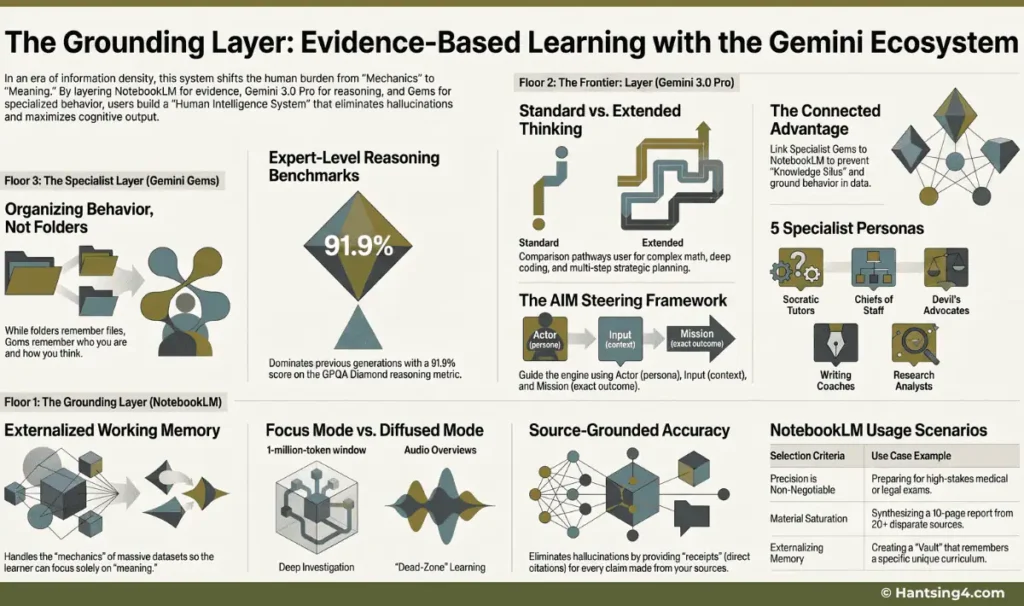
The Gemini learning system is the combination of four Google AI tools, each assigned to a different cognitive job, rather than Gemini as a single chat window that must do everything. Google’s own product lineup maps cleanly onto this idea even though Google itself does not label it this way.
The Four Floors of Intelligence
| Floor | Layer Name | Primary “Job” | Key Google Tool |
|---|---|---|---|
| 4 | Creative & Productivity | Execution & Workflow Integration | Workspace Studio / Nano Banana Pro / VO 3.1 |
| 3 | Specialist | Organizing Behavior & Expertise | Gemini Gems |
| 2 | Frontier | Complex Reasoning & Exploration | Gemini 3.0 Pro (Advanced) |
| 1 | Grounding | Evidence-Based Accuracy | NotebookLM |
The Learning Insight: The “So What?”
- Dissolving Machine Fog: By grounding your AI in specific sources first, you ensure that insights are anchored in reality, preventing the “hallucination loop.”
- Cognitive Efficiency: This framework mimics the human brain’s need for structure, moving information from a crowded Working Memory into Long-Term Memory.
- Systems Over Prompts: Mastery is not about finding the “perfect prompt”; it is about engineering a feedback loop between these layers to ensure no data is lost in a “Knowledge Silo.”
Transitional Insight: While the entire architecture is necessary for a complete system, the journey begins at the Ground Floor, where we anchor our intelligence in “Ground Truth.”
NotebookLM handles grounding: it only answers from documents you give it, so it stays accurate to your specific material. Gemini 3 Pro handles reasoning: it works through problems that do not have one correct answer, like strategic planning or synthesis across sources. Gemini Gems handle behavior: a Gem remembers a persona and a set of instructions, so you are not re-explaining your context every session. The fourth layer, made up of Nano Banana Pro, Veo 3.1, and Workspace Studio, handles output: turning what you have learned into a document, an infographic, a video, or an automated workflow.
The order matters more than any individual tool. Skipping the grounding step and going straight to Gemini 3 Pro for research means you are trusting the model’s general training data instead of your actual sources, which is where most AI-assisted study mistakes start. Building the system bottom-up, starting with NotebookLM, keeps every later step anchored to something verifiable.Systs Over Prompts
How Does NotebookLM Ground Your Research?
NotebookLM grounds your research by answering only from the sources you upload, rather than drawing on general internet knowledge, which sharply reduces the chance of confident but wrong answers. It runs on a large context window (currently a million tokens across every plan, including free), which is enough to hold hundreds of pages of PDFs, transcripts, or slide decks in a single notebook and reason across all of them at once.
NotebookLM as Externalized Working Memory
NotebookLM handles the mechanics of learning—sorting, filing, searching—so you can focus on meaning. It becomes your externalized working memory, holding your curriculum, notes, transcripts, and research in one grounded vault.
Two features do most of the work for learners. The chat function gives you direct citations back to the exact passage in your source, so you can verify a claim in seconds instead of taking the model’s word for it. The Audio Overview feature converts your sources into a two-host, podcast-style discussion, which is useful for reviewing material during a commute or a workout rather than at a desk.
Focus Mode vs Diffused Mode Learning
NotebookLM supports two essential learning modes:
Focus Mode: active investigation using the 1M-token window to analyze large documents.
Diffused Mode: passive absorption using Audio Overviews during commutes or downtime.
This combination improves retention and helps big-picture concepts “click.”
Realist guardrail: the free NotebookLM plan currently allows up to 100 notebooks, 50 sources per notebook, 50 chat queries a day, and 3 Audio Overviews a day. Paid tiers (Plus, Pro, and Ultra) raise those caps and add features like Deep Research and video overviews, but pricing and limits have changed several times over the past year, so check the official NotebookLM page for current numbers before assuming a limit applies. NotebookLM works on a personal Google account. No business or team account is required to get started, and setup is just uploading files, so there is no meaningful technical barrier here.
NotebookLM Capabilities Checklist
- 1-Million-Token Context Window: Handles the equivalent of the entire Harry Potter series in one session.
- Source-Grounded Accuracy: Answers only from your uploaded PDFs, transcripts, and URLs to eliminate hallucinations.
- Direct Citations: Provides the “receipts” to verify exactly where information originated.
- Format Shifting: Rapidly transforms static notes into FAQs, Study Guides, or interactive briefing docs.
Actionable Selection: Choose NotebookLM When…
- Precision is non-negotiable: Such as preparing for medical or legal exams where “close enough” is a failure.
- Drowning in material: You have a 10-page report due and 20+ disparate sources to synthesize.
- Externalizing Memory: You need a “Vault” that remembers your specific curriculum better than a general chatbot.
Transitional Insight: Once you have grounded your facts in the evidence layer, you require a high-level reasoning engine to stress-test those facts and explore complex implications.
When Should You Use Gemini 3 Pro for Complex Reasoning?
Use Gemini 3 Pro when a task has no single correct answer and requires working through implications, not just retrieving a fact. Google reports that Gemini 3 Pro scores 91.9% on GPQA Diamond, a graduate-level science benchmark, and 37.5% on Humanity’s Last Exam without using any external tools, both notably higher than the previous Gemini generation. Google has since released Gemini 3.1 Pro, which pushes those same benchmarks higher still, so if raw reasoning accuracy matters to your use case, it is worth checking whether you are on the 3 or 3.1 version inside your Gemini app.
Standard Thinking vs. Extended Thinking
| Feature | Standard Thinking | Extended Thinking |
|---|---|---|
| Best for | Quick summaries, fast drafts, simple queries | Complex math, deep coding, strategic synthesis |
| Process | Generates a response immediately | Spends extra time planning before responding |
| Companion UI feature | Standard chat | Canvas, a side-by-side collaborative editor |
The “AIM” Framework for Steering Power
A useful steering structure for this layer is the Actor, Input, Mission framing. Define who the model should act as, give it the specific material to work from, and state the exact outcome you want.
Use the AIM structure to provide clear pedagogical guardrails:
A – Actor: Define the persona.
Strategic Template: "You are a Chief of Staff for a Fortune 500 CEO".
I – Input: Provide the context
Strategic Template: "Analyze these three market reports and my internal notes".
M – Mission: Define the exact outcome
Strategic Template: "Identify three blind spots in our expansion strategy".
Realist guardrail: Deep Research and Canvas are available inside the Gemini app, but daily usage limits differ by plan (free, Google AI Pro, or Ultra), and Google has adjusted these limits multiple times as new model versions launch. Confirm current allowances on your account before building a workflow that depends on a specific daily quota.
Transitional Insight: A general engine is powerful, but long-term learning requires specialized “teammates” who remember your specific style and behavior across every session.
What Are Gemini Gems and How Do They Personalize Your Learning?
Gemini Gems personalize your learning by saving a persona and a set of instructions so you stop re-explaining your context every session. Gems represent a fundamental shift from organizing information to organizing behavior. A folder remembers where a file is. A Gem remembers how you want the model to behave, consistently, across every future conversation.
Five Gem personas are especially useful for learners:
- Socratic Tutor: leads you toward an answer through questions instead of giving it to you directly
- Chief of Staff: keeps project timelines and study tasks organized in one place
- Devil’s Advocate: stress-tests an essay or argument for logical gaps
- Writing Coach: reviews drafts against your specific voice and clarity goals
- Research Analyst: scans for gaps or angles within a specific subject or niche
The “Connected Advantage”
The single highest-leverage move in this layer is linking a Gem to a NotebookLM notebook. On its own, a Gem only knows the instructions you gave it. Connected to a notebook, it draws directly from your grounded source material, which prevents the common failure where an AI assistant writes fluently but has no real knowledge of your specific curriculum or project.
Realist guardrail: creating and using Gems is built into the Gemini app on a standard Google account, but higher usage volume and some advanced integrations are tied to a Google AI Pro or Ultra subscription. Confirm current Gem limits and pricing directly on the Gemini app pricing page since Google has restructured its subscription tiers more than once recently.
Transitional Insight: With your specialists established, the focus shifts to the final layer: creating professional-grade output and automating the administrative friction of your workday.
How Do You Turn Learning Into Output With Nano Banana Pro, Veo 3.1, and Workspace Studio?
You turn learning into output by moving from the reasoning and personalization layers into tools built specifically for producing a finished artifact, whether that is an image, a video, or an automated task. This is where the Gemini learning system stops being about understanding and starts being about delivering something usable.
| Tool | What It Actually Does | Learner Use Case |
|---|---|---|
| Nano Banana Pro | Generates images with legible text and up to 4K resolution, and can pull real-time facts through Google Search grounding | Infographics, study diagrams, professional slide visuals |
| Veo 3.1 | Generates 8-second video clips with natively synchronized dialogue, sound effects, and ambient audio | Short video explainers where narration needs to match on-screen action |
| Workspace Studio | A no-code automation layer where a trigger (like a new email or form submission) sets off a chain of actions across Gmail, Sheets, Docs, and Calendar | Summarizing missed meetings, logging research leads, routing study group messages |
Human-in-the-Loop Safety
Workspace Studio is not limited to drafting for your review before every action. Once a workflow is turned on, it can send messages, apply labels, and create documents automatically without a human approving each individual run. If you are automating anything involving outbound communication, build in a testing step and check the workflow’s activity log regularly, because it will act without waiting for you unless you specifically design a review step into the flow.
You must approach Workspace Studio with the mindset: It is an autonomous engine. Many Google Workspace deployment experts and IT partners strongly advise users not to let AI auto-send external customer emails without a human clicking “Send” on a draft first.
If you build a flow that triggers when a blog post updates to automatically draft a newsletter or message, it will execute that action immediately in the background without waiting for your approval—unless you explicitly choose “Draft a reply” instead of “Send email” when building the flow steps.
Always utilize the “Test Run” feature at the bottom of the Studio editor before officially turning any live automation on!
Realist guardrail: Nano Banana Pro image generation is priced per image through the API (roughly $0.14 for 2K and $0.24 for 4K as of its release), though free-tier access exists inside the Gemini app with limited generations. Google has also begun rolling out Nano Banana 2 as the default image model in the Gemini app, with Nano Banana Pro reserved for Pro and Ultra subscribers through a separate menu option, so confirm which model you are actually using. Veo 3.1 is only accessible through Google’s own products (Gemini app, Flow, Vertex AI) since it is a closed-weights model you cannot run independently, and standard-tier generation costs roughly $0.40 per second of video with audio. Workspace Studio requires a Business Standard Google Workspace plan or higher; it is not available on Business Starter plans, and it is built for organizational use rather than a purely personal account.
Transitional Insight: The true power of this ecosystem is not any single tool, but knowing exactly which entry point to select for the challenge at hand.
Which Tool Should You Use for Each Learning Task?
The right tool depends on what the task actually requires, not which tool feels most impressive. Use this as a quick decision guide before opening any of the four layers.
- Need to verify facts across many sources with citations: use NotebookLM
- Need a comprehensive report pulled from the live web: use Gemini 3 Pro’s Deep Research mode
- Need to collaboratively draft or edit a long document: use Gemini 3 Pro’s Canvas mode
- Need a coach that remembers your specific curriculum: build a Gem and link it to a NotebookLM notebook
- Need an image with correctly rendered text for a presentation: use Nano Banana Pro
- Need to automate a repetitive task like inbox sorting: use Workspace Studio, with a review step built in
Building Your First Connected Gemini Workflow
The four layers of the Gemini learning system are not meant to be used in isolation. Their value comes from the connections between them: a NotebookLM notebook feeding a linked Gem, a Gem’s output getting stress-tested inside Gemini 3 Pro, and the final version turned into a shareable artifact through Nano Banana Pro or an automated Workspace Studio routine.
Start with the grounding layer even if it feels slower than jumping straight into a chat window. Upload your actual course materials, client documents, or research papers into a NotebookLM notebook before you ask Gemini 3 Pro to reason about the subject. This single habit prevents most of the accuracy problems people run into with AI-assisted learning.
From there, build one Gem tied to that notebook rather than trying to set up all five persona types at once. Get comfortable with how a connected Gem behaves differently from a generic chat before adding Deep Research, Canvas, or any of the creative production tools on top. Each layer you add should solve a specific friction point you have actually felt, not one you think you might need eventually.
The goal is not to replace your mind but to build a Human Intelligence System. By delegating mechanics—filing, summarizing, formatting—to AI, you free your cognitive resources for meaning, insight, and mastery.
None of this requires becoming technical. It requires being deliberate about which tool is doing which job, and honest with yourself about which account tier you actually need to get there.
Frequently Asked Questions
Continue Your Ecosystem Journey
This learning guide is one part of a broader series on the Google Gemini ecosystem. If you want to see how the same four‑floor architecture applies to solopreneurs or organizations, you can explore the additional guides below.