
Disclosure: This post may contain affiliate links, including Amazon links. As an Amazon Associate I earn from qualifying purchases. Commissions may be earned at no extra cost to you. Content is for informational purposes only and not professional advice.
You can spot AI-generated content from across the room, and so can your audience: the same rounded gradients, the same three sentence structures, the same slightly-too-perfect phrasing. Keeping AI-generated content on brand isn’t about better prompts. It’s about giving the AI a written reference for your brand that’s more specific than a vibe, so it has something concrete to match instead of defaulting to generic.
5-Minute Version
- Generic-looking AI output is usually a missing-reference problem, not a bad-prompt problem. Claude, like most AI tools, defaults to safe, average choices without a specific brand document to anchor to.
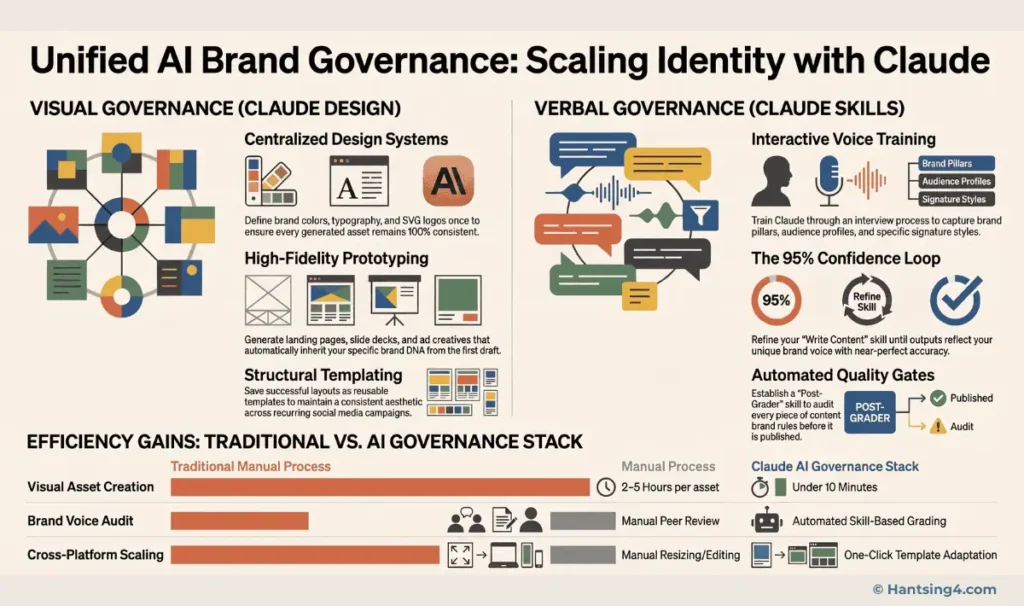
- The fix has two halves: a visual design system for how things look, built in Claude Design, and a written voice skill for how things sound, a reusable instruction file Claude applies automatically.
- Claude Design is currently in beta, available to Claude Pro, Max, Team, and Enterprise subscribers at claude.ai/design; it is not included on the free plan.
- A common shortcut is dragging in a DESIGN.md file from a third-party community library like getdesign.md to jump-start a look. These files are built for AI coding agents, not officially for Claude Design, and are unofficial, unlicensed analyses of public brands. Treat them as inspiration to adapt, never as a finished system to ship.
- None of this is a one-time setup. Brand drift creeps back in without a regular feedback loop where you correct the AI and ask it to update its own reference document.
Why Does AI Content Default to Generic?
AI models are trained to produce broadly acceptable output by default, which means without specific direction they land on the visual and verbal middle ground: the gradient that looks fine on any brand, the sentence structure that sounds fine in any voice. This isn’t a flaw specific to any one tool; it’s the predictable result of a model that has no information about what makes your brand different from the one it generated for someone else five minutes earlier.
The fix isn’t a cleverer one-line prompt. It’s giving the model a persistent, specific reference document it can check itself against every time, the same way a new hire uses a brand guidelines PDF instead of guessing your tone from scratch on day one.
Building the Visual Half: A Design System in Claude Design
Claude Design is a separate Anthropic product from regular Claude chat, purpose-built for prototypes, slides, one-pagers, and visual work, available at claude.ai/design. It’s currently in beta and only available to Claude Pro, Max, Team, and Enterprise subscribers, so this workflow doesn’t work on a free Claude account.
What actually goes into the reference document
The reference is typically a plain markdown file, often called a DESIGN.md, that spells out your color values, font choices, spacing habits, and general visual tone in concrete terms rather than adjectives. “Warm, editorial, generous whitespace” gives the AI something to work with; “make it look professional” does not. Once this file is attached inside a Claude Design project, Claude applies it automatically to future prompts in that project without you re-specifying colors and fonts every time.
The community shortcut, and its limits
A popular shortcut among early adopters is getdesign.md, a community-maintained library of DESIGN.md files reverse-engineered from well-known brands like Stripe, Notion, and Vercel. It’s built specifically for AI coding agents, Claude Code, Cursor, and similar tools, to generate consistent UI, not for Claude Design directly. Dragging one of these into a Claude Design project as a starting point still works as a fast way to see what a well-specified design system produces, but it’s a repurposing of the tool rather than its documented use case.
Two caveats matter here. First, these files are independent, unofficial analyses of publicly observable design patterns; they are not licensed brand assets, and the project maintaining them is explicit that it isn’t affiliated with or endorsed by the brands it describes. Second, using an unmodified competitor or well-known brand’s system for your own published content risks looking derivative rather than distinctive, which works against the entire point of a brand governance exercise. Treat borrowed files as inspiration to adapt, not a finished system to ship.
Building the Written Half: A Reusable Voice Skill
A design system controls how things look. It says nothing about how your captions, emails, or posts should sound, which is a separate governance problem solved with a different mechanism: a Skill, Claude’s term for a saved, reusable set of instructions it reads before doing a specific kind of task, similar in spirit to onboarding notes for a new writer on your team.
A pure-text voice skill like this works in a regular Claude.ai conversation, not just inside Claude Cowork; Cowork is simply a strong natural home for it if you’re already running your content production there, since it’s built for exactly this kind of ongoing, file-based work. Building a voice skill worth using takes an honest interview process, not a quick list of adjectives.
- Platform priorities: which channel matters most, and how tone should shift for the others.
- Content pillars: the two or three themes everything you publish should trace back to.
- Negative constraints: specific words or phrasing patterns that should never appear. This is often more useful than a list of what to include.
- Structural habits: typical post length, how you open and close, whether you use emojis or numbers over spelled-out digits.
- Real examples: paste in two or three pieces of content you’re proud of. Concrete examples anchor a voice far better than a description of one.
Feed these into a working session and ask Claude to draft the skill file itself, then review it the way you’d review a new employee’s notes on your preferences, correcting anything that’s off before you start relying on it.
How Do You Keep the System From Drifting Over Time?
A design system and a voice skill both decay without maintenance, the same way a style guide gathers dust in a shared drive if nobody updates it after the first draft. The fix is a habit, not a one-time project: every time Claude produces something off-brand, correct it in the moment and then explicitly ask it to update the relevant skill or design file with that feedback, rather than only fixing the one piece of content in front of you.
This matters because a correction you give once, in one conversation, doesn’t persist anywhere unless you ask for it to be written down. “Never use emojis” said once in passing is forgotten by your next session. “Never use emojis, please update the voice skill with this” becomes a permanent rule the next writer, human or AI, will follow.
A short pre-publish check catches what the reference documents miss on their own:
| Check | What it catches |
|---|---|
| Banned words and phrases | Generic hype language your voice skill flagged during setup that slipped back in anyway |
| Claim accuracy | Statistics, numbers, or promises that are not actually verifiable or true for your business right now |
| Platform fit | Copy length, hashtag use, and aspect ratio that do not match the platform you are about to publish to |
| Tone match | Whether this specific draft sounds like the examples you used to train the voice skill, not just technically correct |
What This System Cannot Do
A written design system and voice skill raise the floor on AI output; they don’t guarantee every draft is publish-ready. A few honest limits are worth setting expectations around before you build this out.
- You are still the final editor. A good reference document reduces how often output feels generic; it doesn’t eliminate the need for a human read-through before anything goes live, especially for claims, numbers, or anything time-sensitive.
- Claude Design is still in beta. Anthropic has described it as an early product with rough edges, so expect some features to change or move as it develops further.
- Setup takes real time, not minutes. A thorough voice interview and a properly specified design system each take a genuine working session to build well; rushing either one produces a shallow reference that doesn’t hold up under real use.
Treating Brand Governance as Infrastructure, Not a One-Off Task
The most useful shift here is thinking of your design system and voice skill as infrastructure you maintain, not documents you write once and forget. Every recurring correction is a signal that belongs in the reference file, not just in that day’s conversation. Solo creators who treat this as ongoing upkeep, ten minutes after a bad draft rather than a weekend project once a quarter, are the ones whose AI-generated content actually stops looking like AI-generated content.
Once your brand system is genuinely locked in, it pays off fastest when you start producing at volume. Our framework for batching social media content with AI covers how to put a working brand system to use across a full week of content in a single sitting.