
Disclosure: This post may contain affiliate links. Commissions may be earned at no extra cost to you. Content is for informational purposes only and not professional advice.

Most people assume they already know how to communicate digitally. After all, they send emails every day, jump on video calls, and fire off messages in Slack or Teams without much thought. But there is a significant difference between using digital tools and using them well. That gap, invisible as it can feel, has real consequences for how you are perceived, how effectively you collaborate, and how smoothly your work actually gets done.
The good news is that strong digital communication is not a mysterious talent some people have and others do not. It is a set of learnable habits and judgment calls that anyone can develop with a little awareness and practice. This guide walks through what those habits are and how to build them, without making it more complicated than it needs to be.
Why This Actually Matters
It is worth pausing on the stakes for a moment, because they are higher than most people realize.
Research tracking workplace communication in 2026 puts the cost of poor communication at anywhere between $9,284 and over $30,000 per employee per year, a figure that reflects not just obvious mistakes but all the small friction points that accumulate daily: the email that had to be sent twice because the first one was unclear, the meeting called to resolve a misunderstanding that a well-written message could have prevented, the project delayed because two people interpreted the same instruction differently.
Separate analysis found that employees spend up to 17 hours a week resolving ambiguities caused by poor communication, which is roughly half a standard workweek handed over to cleaning up confusion rather than doing actual work. When you frame it that way, improving how you communicate digitally is not a soft skill nicety. It is one of the highest-leverage things you can do for your own productivity and your professional reputation.
The flip side is equally true. People who communicate clearly tend to be trusted more, given more responsibility, and seen as easier to work with. These are not minor career advantages.
The Foundation: Writing Clearly and Concisely
Because so much of digital communication is written, the ability to write clearly is the most foundational skill in this entire guide. Not literary writing, not formal writing, just clear, purposeful writing that says what it needs to say without making the reader do extra work.
A few principles go a long way here.
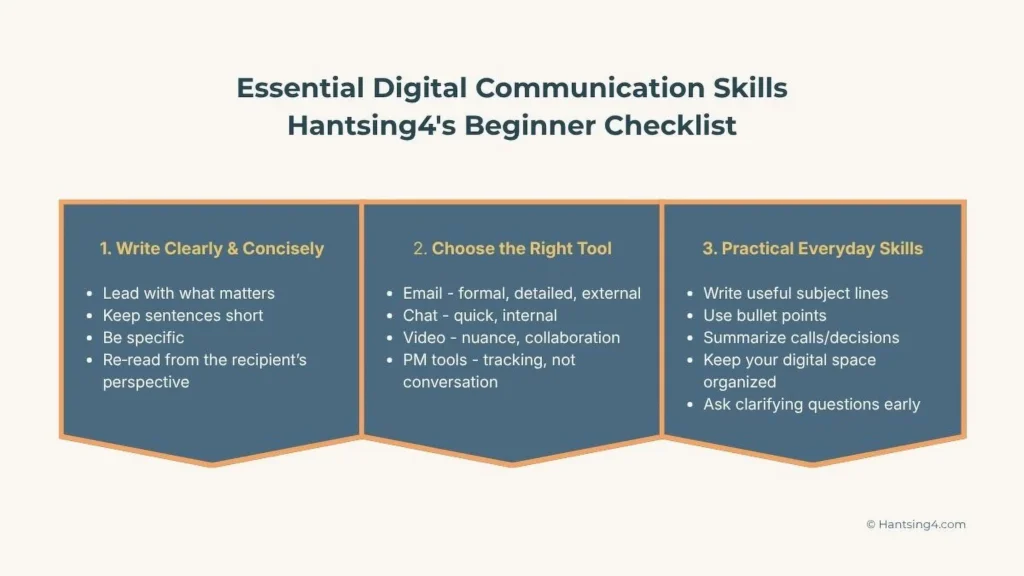
Lead with what matters most. In any email or message, the most important information belongs at the top, not buried in the third paragraph. Readers in a busy workplace scan quickly, and if your main point requires effort to find, it often gets missed.
Keep sentences short. Long, winding sentences are harder to follow in a digital context than they are on paper, partly because screens are less forgiving and partly because readers are often multitasking. If a sentence is running long, split it.
Be specific about what you need. Vague messages create follow-up questions, which create delays, which create the kind of friction described above. Instead of “let me know your thoughts,” try “could you confirm by Thursday whether the revised timeline works for your team?” One of those prompts gets a response. The other often does not.
Before sending anything significant, read it once as if you are the person receiving it. Ask whether a reasonable person could misread or misinterpret what you have written. If the answer is yes, adjust it before it goes.
Choosing the Right Tool for the Right Message
One of the most underappreciated skills in digital communication is knowing which channel to use in the first place. Most workplaces now have email, a chat platform, video calls, and possibly project management tools all running simultaneously, and defaulting to one for everything creates real inefficiency.
A practical framework for this is simpler than it might seem.
Email works best for messages that are formal, detailed, need a clear record, or are going to someone outside your organization. If you are summarizing a decision, sharing something that will be referenced later, or communicating with a client, email is usually the right choice. It does not demand an immediate response, which is part of its value.
Chat platforms like Slack or Teams are better suited to quick, informal exchanges within your team. A fast question, a brief update, a low-stakes check-in. Chat grabs attention faster than email, and for high-stakes issues where misinterpretation could cause delays, a real-time conversation, whether chat or call, prevents the back-and-forth that written messages can create. That said, chat has its own pitfalls: it can feel urgent even when it is not, and the always-on expectation it creates is one of the primary drivers of digital burnout.
Video calls are valuable for anything that involves nuance, genuine collaboration, or sensitive topics. If a written exchange has already gone back and forth three or more times without resolution, that is a signal to switch to a call. When a message is complicated or has the potential to be misinterpreted, and especially when tone matters, a call resolves in minutes what emails can drag out for days. Video also matters for relationship-building in remote or hybrid environments, where the informal moments that create team cohesion have to be deliberately created rather than happening naturally.
Project management tools like Asana, Notion, or Monday are for tracking work, not for having conversations. Mixing communication into these tools tends to scatter the record of decisions in ways that are hard to follow later.
The general principle: match the urgency, formality, and complexity of your message to the channel that handles those qualities best. Using the wrong tool is not just slightly inefficient. It changes how your message lands and how quickly it gets addressed.
Digital Etiquette: The Unwritten Rules That Shape How You Are Perceived
Every digital environment has norms, and navigating them well is part of what separates people who feel easy to work with from those who create friction without realizing it.
Tone is the trickiest part of written communication, because text strips away the vocal and facial cues that carry a lot of meaning in person. A message that seems neutral to the writer can read as curt or dismissive to the reader. Reading your messages before sending, especially anything that touches on a sensitive topic or a disagreement, and asking whether the tone is what you intend, is a habit worth building early.
Response time expectations vary by channel. Chat generally implies a faster response than email, but neither requires being available every moment. If your workplace culture leans toward constant availability, it is worth being deliberate about when you are and are not reachable, not as a rebellion but as a sustainability practice. Research has found that 60% of workers identify digital communication as a significant contributor to burnout, and a large part of that is the pressure to be perpetually responsive regardless of what else you are working on.
On video calls, a few habits make a significant difference. Muting when you are not speaking removes background noise that makes calls harder to follow. Showing up on time respects the group’s collective attention. Being present, rather than multitasking, makes you more useful in the conversation and signals that you take it seriously. If your camera is on, your background and lighting are part of the impression you make, even informally.
In chat, brevity is a form of consideration. Long, essay-style messages in a channel built for quick exchanges create friction. If a message needs length to do its job, email is probably the better vehicle.
Practical Skills That Make a Real Difference Day to Day
Beyond the principles above, a handful of specific habits tend to have an outsized effect on how smoothly digital communication goes.
Write useful subject lines. An email subject line is the first thing the recipient reads and often determines whether and when they open the message. “Quick question” tells them nothing. “Approval needed by Friday: Q3 budget revision” tells them exactly what is inside and what is required of them. Treat the subject line as the headline of the message.
Use bullet points for complex information. When a message involves multiple distinct points, a numbered or bulleted list is far easier to respond to than the same information buried in paragraphs. It also makes it harder for items to be overlooked.
Summarize calls and decisions in writing. After a significant conversation or meeting, a short written summary sent to the relevant people, covering what was decided, who is responsible for what, and any deadlines, creates a shared record that prevents the “I thought we agreed…” conversations that waste time. This does not need to be long. Three to five lines is often enough.
Organize your digital environment. Inboxes, folders, and file-naming conventions may seem like administrative details, but they directly affect how quickly you can find what you need and respond to what requires action. A cluttered inbox is not just aesthetically chaotic. It means things get lost. A simple folder structure and a habit of clearing processed emails out of your inbox makes your communication more reliable.
Ask clarifying questions early. When you receive a request or instruction that is not entirely clear, asking for clarification upfront takes 30 seconds and can save hours of rework. Most people prefer a quick question to work that comes back needing to be redone.
Building Confidence With Digital Tools
If you are newer to some of the tools your workplace uses, the path to confidence is straightforward: start with the features you need most, use them consistently, and add capability gradually. You do not need to know everything about a tool to use it effectively. You need to know the parts that are directly relevant to how you work.
Online tutorials on platforms like YouTube or the tool’s own help documentation can close gaps quickly. Most major tools, including Outlook, Gmail, Slack, Teams, Zoom, and Google Workspace, have extensive free learning resources available. Asking a colleague who uses a tool well to walk you through their setup takes 15 minutes and often covers more than hours of self-guided exploration.
The broader mindset worth cultivating is one of mild curiosity rather than avoidance. Digital tools change regularly, and the people who adapt well are not necessarily the most technical. They are the ones who stay interested and are willing to try new features without waiting until they have to.

A Note on Remote and Hybrid Work
Everything in this guide applies in any work setting, but it carries extra weight in remote and hybrid environments, where digital communication is not just one channel among several but often the primary way work gets done and relationships are maintained.
In these settings, the cost of unclear communication is higher because there is no hallway conversation to catch a misunderstanding before it becomes a problem. Being intentional about when you communicate, how you communicate, and making sure important decisions are documented, becomes genuinely important rather than merely good practice.
Proactive communication also matters more at a distance. Letting relevant people know where things stand, flagging blockers early, and confirming understanding before moving forward on significant work reduces the invisible coordination costs that make remote collaboration harder than it needs to be.
Where to Start
If you want to improve your digital communication and are not sure where to begin, pick one thing from this guide that feels most relevant to how you work right now and focus on that for two weeks.
For most people, the highest-return starting point is writing more clearly: reading messages before sending them, leading with the most important information, and being specific about what you need. That single habit, applied consistently, tends to generate noticeable results faster than almost anything else.
From there, the rest of this builds naturally. Better judgment about which tool to use. More awareness of tone. Cleaner organization. Each improvement makes the next one easier, and over time the habits become second nature rather than something you have to consciously remember.
Digital communication is not a fixed skill you either have or you do not. It is a practice that gets better with attention. And the attention, it turns out, is well worth it.
To see how you can accelerate your learning, read: Learning in the Age of AI: How to Build Skills Faster, Smarter, and With Less Overwhelm